Integrating InMobi SDK with Unity is easy.
You can get the following ad types from InMobi via the Unity plugin on both Android and iOS apps:
You require the following to run the latest version of the Unity plugin:
| SDK Version | |
| Size |
iOS - 692 KB (.IPA Inflation) Android - 375.341 KB (.APK Inflation) |
| Plugins |
Follow these simple steps and start monetizing with InMobi:
Select Assets Import Package Custom Package, and search for the InMobiAdsUnityPlugin.unitypackage file you downloaded.
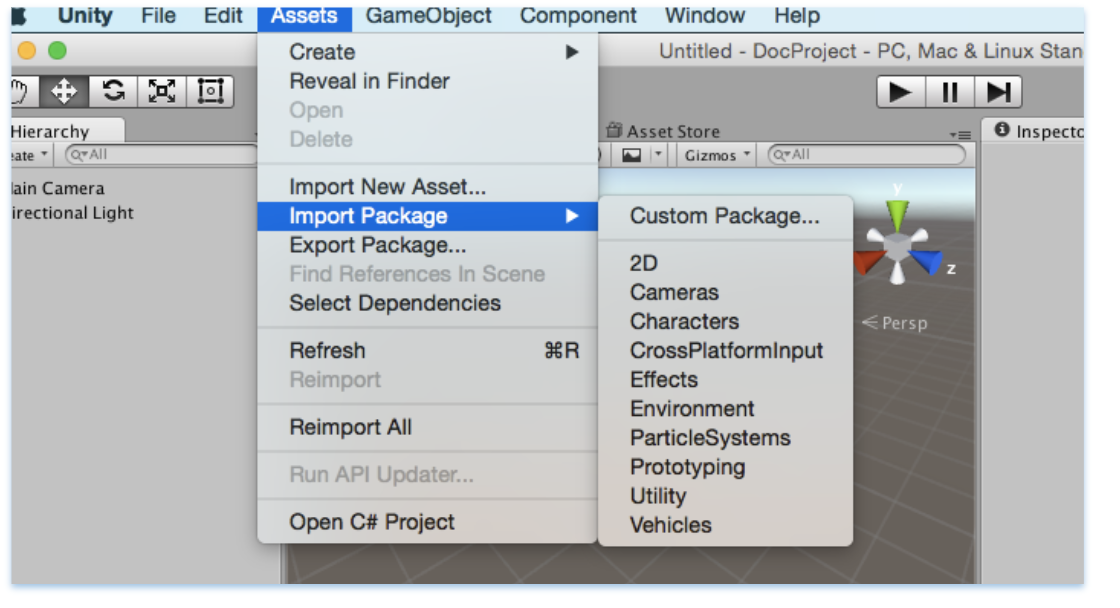
Make sure all the files are selected, and then click Import.

You can use the common C# API in the InMobi Ads plugin to request banner, interstitial, and rewarded video ads. The code can be written once and deployed to both Android and iOS.
There are multiple APIs provided in InMobiPlugin Class to pass on Demographic information to InMobi SDK which helps us in better ad targeting.
Some of them are as follows:
//Set Age
public void SetAge(int age){
inmobiPluginClient.SetAge (age);
}
//Set PostalCode
public void SetPostalCode(string postalCode){
inmobiPluginClient.SetPostalCode (postalCode);
}
//Set Year of Birth
public void SetYearOfBirth(int yearOfBirth){
inmobiPluginClient.SetYearOfBirth (yearOfBirth);
}
//Set Gender GENDER_MALE or GENDER_FEMALE
public void SetGender(string gender){
inmobiPluginClient.SetGender (gender);
}
You can use the InMobiPlugin Class to initialize the InMobi SDK. Account Id is required to initialize the InMobi SDK.
Here is the sample code to initialize the InMobi SDK:
private void initializeInMobiAds () {

//Account id used here is test account id

InMobiPlugin inmobiPlugin = new InMobiPlugin();

    inmobiPlugin.OnInitializationCompleted += this.HandleInitializationStatus;

    Dictionary<string, object=""> consentObject = new Dictionary<string, object="">();

#if UNITY_ANDROID

consentObject.Add(InMobiPlugin.IM_GDPR_CONSENT_AVAILABLE, true);

#elif (UNITY_5 && UNITY_IOS) || UNITY_IPHONE

    consentObject.Add(InMobiPlugin.IM_GDPR_CONSENT_AVAILABLE, “true”);
#endif

    consentObject.Add(InMobiPlugin.IM_GDPR_CONSENT_IAB, "IAB_STRING");
    inmobiPlugin.Init("4028cb8b2c3a0b45012c406824e800ba", consentObject);
}

public void HandleInitializationStatus (object sender, SdkInitializationStatusArgs args) {

Debug.Log("SDK Initialization status code : " + args.status.Code + " and reason : " +
        args.status.Reason);
}
Let’s understand a few things here before you proceed:
What is a consentObject? - A consentObject is a dictionary representation of all kinds of consent provided by the publisher to the SDK. The key is mandatory if you wish to monetize traffic from EEA region. You can read further on GDPR regulations here.
| Key | Type | Inference |
| gdpr_consent | String | A consent string is a series of numbers, which identifies the consent status of an Adtech Vendor. The string must follow the IAB contracts as mentioned here. |
| gdpr_consent_available | String (iOS) | For iOS, the value should be passed as String: "true": User has provided consent to collect and use data. "false": User has not provided consent to collect and use data. Any value other than “true” and “false” is invalid and will be treated as value not provided by user. This key can be accessed via string constant IM_GDPR_CONSENT_IAB. |
| Bool (Android) | For Android, the value should be passed as Bool: true: User has provided consent to collect and use data. false: User has not provided consent to collect and use data. Any value other than true and false is invalid and will be treated as value not provided by user. This key can be accessed via string constant IM_GDPR_CONSENT_IAB. |
|
| gdpr | String | Whether or not the request is subjected to GDPR regulations (0 = No, 1 = Yes), omission indicates Unknown. |
As part of the General Data Protection Regulation (“GDPR”) publishers who collect data on their apps, are required to have a legal basis for collecting and processing the personal data of users in the European Economic Area (“EEA”). Please ensure that you obtain appropriate consent from the user before making ad requests to InMobi for Europe and indicate the same by following our recommended SDK implementation. Please do not pass any demographics information of a user; if you do not have user consent from such user in Europe.
It is mandatory to initialize the InMobi SDK before making any ad request to InMobi. It is advised to do it at the start of the app itself.
For COPPA compliance, you can indicate whether the user is a child. Set to true if the user is under 13 in the US, or the applicable age in other regions.
// Set age restriction for COPPA compliance
// Set to true if the user is a child (under 13 in US)
inMobiPlugin.SetAgeRestriction(true);
Publisher Signals
Publisher Signals allow you to pass contextual data to improve ad targeting and yield. You can signal information about user behavior, acquisition source, and other attributes to help generate better ad performance.
Setting Publisher Signals
Create a dictionary with signal keys and values, then pass it to the SDK. This method must be called after InMobi SDK is successfully initialized. Ensure you call this function and update the values before every ad request.
// Create a dictionary with all required signals and corresponding values
Dictionary<string, object=""> publisherSignals = new Dictionary<string, object="">();

// User monetization signals
publisherSignals.Add("iap", true);              // User has made IAP
publisherSignals.Add("ua_type", "paid");        // User is acquired via paid medium
publisherSignals.Add("iap_type", "minnow");     // User has made low purchases
publisherSignals.Add("iaa_type", "whale");      // User has seen high number of ads

// Session and impression depth signals
publisherSignals.Add("s_dep_rew", 4);           // User has seen 4 rewarded ads in current session
publisherSignals.Add("i_dep_rew", 10);          // User has seen 10 rewarded ads in lifetime

// Performance signals
publisherSignals.Add("ctr_rew", 9.25);          // Historical CTR for user is 9.25%
publisherSignals.Add("abp_5_rew", 0.01720);     // Average winning bid price for last 5 rewarded auctions was $0.01720, eCPM is $17.2

// Pass the signals to InMobi SDK
inMobiPlugin.PutPublisherSignals(publisherSignals);
</string,></string,>
Getting Publisher Signals
You can retrieve the currently set signals to verify what data is being passed.
// Check what signals are set already
Dictionary<string, object=""> currentSignals = inMobiPlugin.GetPublisherSignals();</string,>
Resetting Publisher Signals
Clear all the signals data for the user when needed.
// Clear all the signals data for the user
inMobiPlugin.ResetPublisherSignals();
You must provide a consentObject in every session. SDK does not persist consent, it only keeps the consentObject in memory. If the app is relaunched, SDK will lose the consentObject. Within a session, a consentObject can be updated as below:
Dictionary<string, object=""> consentObject = new Dictionary<string, object="">();

    #if UNITY_ANDROID

        consentObject.Add(InMobiPlugin.IM_GDPR_CONSENT_AVAILABLE, true);

    #elif (UNITY_5 && UNITY_IOS) || UNITY_IPHONE

        consentObject.Add(InMobiPlugin.IM_GDPR_CONSENT_AVAILABLE, “true”);

    #endif

    consentObject.Add(InMobiPlugin.IM_GDPR_CONSENT_IAB, "IAB_STRING");

    inmobiPlugin.UpdateGdprConsentObject(consentObject);
Following is the minimal code to create and load a banner ad:
private void RequestBanner ()
{
  // These placement Ids are configured to always serve test ads.
  #if UNITY_ANDROID
  string placementId = "1467162141987";
  #elif UNITY_IPHONE
  string placementId = "1464947431995";
  #endif
  // Create a 320x50 banner at the bottom of the screen.
  this.bannerAd = new BannerAd (placementId, 320, 50, (int)InMobiAdPosition.BottomCenter);
  // Register for ad events.
this.bannerAd.OnAdLoadSucceeded += this.HandleOnAdLoadSucceeded;    // Called when ad is loaded successfully
this.bannerAd.OnAdLoadFailed += this.HandleAdLoadFailed;            // Called when ad fails to load
this.bannerAd.OnAdFetchSuccessful += this.HandleAdFetchSuccessful;  // Called when ad content is fetched successfully
this.bannerAd.OnAdFetchFailed += this.HandleAdFetchFailed;          // Called when ad fetch fails
this.bannerAd.OnAdImpression += this.HandleAdImpression;            // Called when ad impression is recorded
this.bannerAd.OnAdDisplayed += this.HandleAdDisplayed;              // Called when ad is displayed on screen
this.bannerAd.OnAdDismissed += this.HandleAdDismissed;              // Called when ad is dismissed
this.bannerAd.OnAdInteraction += this.HandleAdInteraction;          // Called when user interacts with ad
this.bannerAd.OnUserLeftApplication += this.HandleUserLeftApplication; // Called when user leaves app via ad
// Load a banner ad.
  this.bannerAd.LoadAd ();
}
InMobiAdPosition enum specifies where to place the banner.
Each platform, iOS and Android, requires a unique placement Id. Rest of the APIs remain same for both platforms.
// Set extras for ad targeting. All values must be passed as string.
Dictionary<string, string=""> extras = new Dictionary<string, string="">();
extras.Add("tp", "admob");           // Mediation partner name
extras.Add("tp_ver", "19.0.0");      // Mediation partner SDK version
this.bannerAd.SetExtras(extras);

</string,></string,>
Please note that the integration for interstitial and full-screen video ads is same. Following is the minimal code to load an interstitial ad:
  private void RequestInterstitial ()
{
  // These placement Ids are configured to always serve test ads.
  #if UNITY_ANDROID
  string placementId = "1469137441636";
  #elif UNITY_IPHONE
  string placementId = "1467548435003";
  #endif
  // Create an interstitial.
  this.interstitialAd = new InterstitialAd (placementId);
  // Register for ad events.
  this.interstitialAd.OnAdLoadSucceeded += this.HandleOnAdLoadSucceeded;    // Called when ad is loaded successfully
this.interstitialAd.OnAdLoadFailed += this.HandleAdLoadFailed;            // Called when ad fails to load
this.interstitialAd.OnAdFetchSuccessful += this.HandleAdFetchSuccessful;  // Called when ad content is fetched successfully
this.interstitialAd.OnAdFetchFailed += this.HandleAdFetchFailed;          // Called when ad fetch fails
this.interstitialAd.OnAdImpression += this.HandleAdImpression;            // Called when ad impression is recorded
this.interstitialAd.OnAdDisplayed += this.HandleAdDisplayed;              // Called when ad is displayed on screen
this.interstitialAd.OnAdDismissed += this.HandleAdDismissed;              // Called when ad is dismissed
this.interstitialAd.OnAdInteraction += this.HandleAdInteraction;          // Called when user interacts with ad
this.interstitialAd.OnUserLeftApplication += this.HandleUserLeftApplication; // Called when user leaves app via ad
  this.interstitialAd.OnAdDisplayFailed += this.HandleAdDisplayFailed;
  this.interstitialAd.OnAdWillDisplay += this.HandleAdWillDisplay;
  // Load an interstitial ad.
  this.interstitialAd.LoadAd ();
}
Interstitial ads need to be shown explicitly, but before that check if interstitial ad is ready or not by calling isReady () as depicted below:
  if (this.interstitialAd.isReady ()) {
   this.interstitialAd.Show ();
  } else {
   MonoBehaviour.print ("Interstitial is not ready yet");
  }
A good place to show an interstitial ad is end of a level or end of session.
// Set extras for ad targeting. All values must be passed as string.
Dictionary<string, string=""> extras = new Dictionary<string, string="">();
extras.Add("tp", "admob");           // Mediation partner name
extras.Add("tp_ver", "19.0.0");      // Mediation partner SDK version
this.interstitialAd.SetExtras(extras);

</string,></string,>
Following is a minimal code to load a rewarded video ad:
  private void RequestRewardBasedVideo ()
{
  // These placement Ids are configured to always serve test ads.
  #if UNITY_ANDROID
  string placementId = "1453753057988";
  #elif UNITY_IPHONE
  string placementId = "1465883204802";
  #endif
  this.rewardedVideoAd = new RewardedVideoAd (placementId);
  // Register for ad events.
  this.rewardedVideoAd.OnAdLoadSucceeded += this.HandleOnAdLoadSucceeded;
  this.rewardedVideoAd.OnAdLoadFailed += this.HandleAdLoadFailed;
  this.rewardedVideoAd.OnAdFetchSuccessful += this.HandleAdFetchSuccessful;
  this.rewardedVideoAd.OnAdFetchFailed += this.HandleAdFetchFailed;
  this.rewardedVideoAd.OnAdDisplayed += this.HandleAdDisplayed;
  this.rewardedVideoAd.OnAdDismissed += this.HandleAdDismissed;
  this.rewardedVideoAd.OnAdImpression += this.HandleAdImpression;
  this.rewardedVideoAd.OnAdInteraction += this.HandleAdInteraction;
  this.rewardedVideoAd.OnUserLeftApplication += this.HandleUserLeftApplication;
  this.rewardedVideoAd.OnAdDisplayFailed += this.HandleAdDisplayFailed;
  this.rewardedVideoAd.OnAdWillDisplay += this.HandleAdWillDisplay;
  this.rewardedVideoAd.OnAdRewardActionCompleted += this.HandleRewardActionCompleted;
  this.rewardedVideoAd.LoadAd ();
}
Rewarded video ads work in a similar way to interstitial ads and need to be checked whether they are ready before calling show ().
  private void ShowRewardBasedVideo ()
{
  if (this.rewardedVideoAd.isReady ()) {
   this.rewardedVideoAd.Show ();
  } else {
   MonoBehaviour.print ("Rewarded video ad is not ready yet");
  }
}
You can set the following ad events on a banner, interstitial, and rewarded video ad.
 #region callback handlers
   public void HandleOnAdLoadSucceeded(object sender, AdLoadSuccessEventArgs args)
{
    MonoBehaviour.print("HandleOnAdLoadSucceeded event received");
    // Access ad metadata from the event args
    MonoBehaviour.print("Creative ID: " + args.AdMetaInfo.CreativeID);
    MonoBehaviour.print("Bid: " + args.AdMetaInfo.Bid);
    MonoBehaviour.print("Bid Keyword: " + args.AdMetaInfo.BidKeyword);
}
   public void HandleAdLoadFailed (object sender, AdLoadFailedEventArgs args)
{
  MonoBehaviour.print ("HandleAdLoadFailed event received with message: " + args.Error);
}
   public void HandleAdDisplayed (object sender, EventArgs args)
{
  MonoBehaviour.print ("HandleAdDisplayed event received");
}
  public void HandleAdDismissed (object sender, EventArgs args)
{
  MonoBehaviour.print ("HandleAdDismissed event received");
}
  public void HandleAdInteraction (object sender, AdInteractionEventArgs args)
{
  MonoBehaviour.print ("HandleAdDismissed event received " + args.Message);
}
  public void HandleUserLeftApplication (object sender, EventArgs args)
{
  MonoBehaviour.print ("HandleUserLeftApplication event received");
}
#endregion
#region Interstitial specific callback handlers
public void HandleAdReceived (object sender, EventArgs args)
{
  MonoBehaviour.print ("HandleAdReceived event received");
}
  public void HandleAdWillDisplay (object sender, EventArgs args)
{
  MonoBehaviour.print (
   "HandleAdWillDisplay event received with message: ");
}
  public void HandleAdDisplayFailed (object sender, EventArgs args)
{
  MonoBehaviour.print ("HandleAdDisplayFailed event received");
}
   #endregion
  #region RewardBasedVideo specific callback handlers
   public void HandleRewardActionCompleted (object sender, AdRewardActionCompletedEventArgs args)
{
  MonoBehaviour.print (
   "HandleRewardActionCompleted event received for " + args.Rewards);
}

public void HandleAdFetchSuccessful(object sender, AdFetchSuccessEventArgs args)
{
    // Called when ad content is successfully fetched
    // Access ad metadata from the event args
    MonoBehaviour.print("HandleAdFetchSuccessful event received");
    MonoBehaviour.print("Creative ID: " + args.AdMetaInfo.CreativeID);
    MonoBehaviour.print("Bid: " + args.AdMetaInfo.Bid);
}

public void HandleAdFetchFailed(object sender, AdFetchFailedEventArgs args)
{
    // Called when ad fetch fails
    MonoBehaviour.print("HandleAdFetchFailed event received");
    MonoBehaviour.print("Error: " + args.Error);
}

public void HandleAdImpression(object sender, EventArgs args)
{
    // Called when an ad impression is recorded
    MonoBehaviour.print("HandleAdImpression event received");
}

#endregion
The args.Rewards, specific to rewarded video ad, is in JSON String format.
| Class | Properties |
| AdFetchSuccessEventArgs | AdMetaInfo |
| AdFetchFailedEventArgs | Error (string) |
| AdLoadSuccessEventArgs | AdMetaInfo |
| Property | Type | Description |
| CreativeID | string | Unique identifier for the ad creative |
| Bid | double | Bid value for the ad |
| BidInfo | JObject | Additional bid information |
| BidKeyword | string | Keyword associated with the bid |
By installing this SDK update, you agree that your Children Privacy Compliance setting remains accurate or that you will update that setting, whenever there is a change in your app's audience. You may update the app's Children Privacy Compliance settings at https://publisher.inmobi.com/my-inventory/app-and-placements.
 Support Center


