InMobi原生广告支持静态广告和视频广告。您可以选择信息流广告、启动画面广告或前置广告格式。创建原生广告位的步骤如下。
InMobi原生广告支持静态广告和视频广告。您可以选择信息流广告、启动广告或前置广告格式。创建原生广告位的步骤如下。
原生广告位创建完成后,您将能够看到广告位 ID。
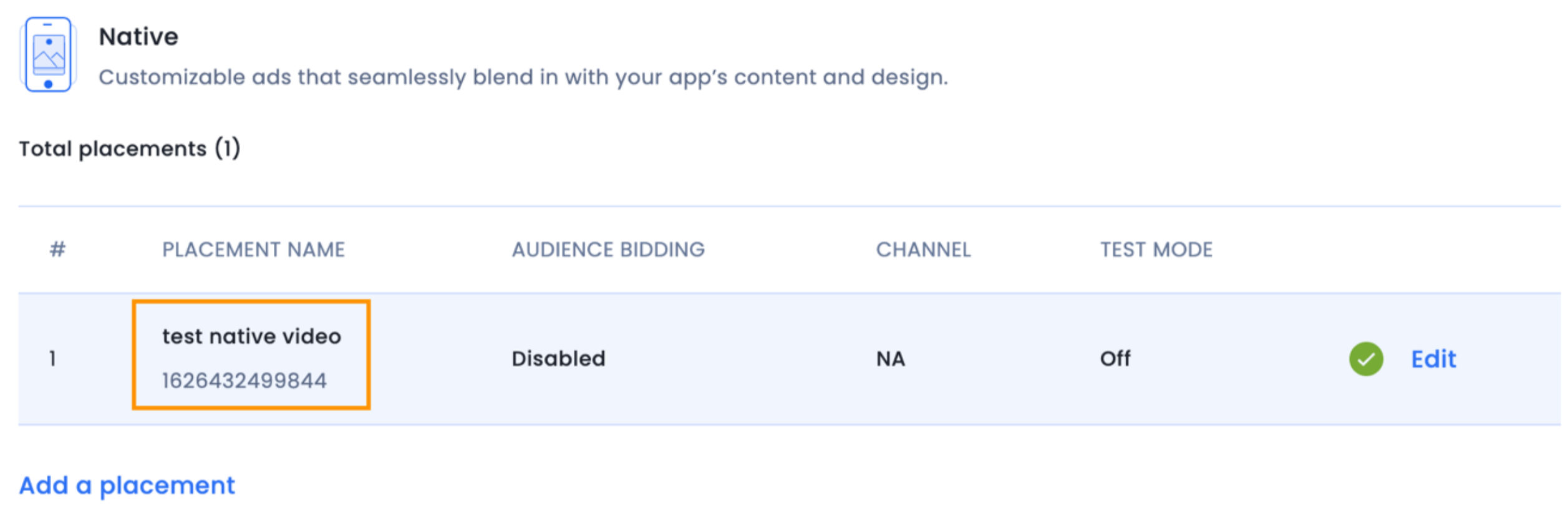
要创建原生广告,请创建一个InMobiNative实例:
public class NativeAdsActivity extends Activity {
    ……………………
    private final List<InMobiNative> mNativeAds = new ArrayList<>();
    ……………………
    InMobiNative nativeAd = new InMobiNative(NativeAdsActivity.this, YOUR_PLACEMENT_ID, nativeAdEventListener);
    nativeAd.load();
    mNativeAds.add(nativeAd);
    ……………………
}
class NativeAdsActivity : Activity {
   ……………………
   private val mNativeAds : List<inmobinative> = ArrayList()
   ……………………
   val nativeAd = InMobiNative(this@NativeAdsActivity, YOUR_PLACEMENT_ID, nativeAdEventListener)
   nativeAd.load()
   mNativeAds.add(nativeAd)
   ……………………
}
以下nativeAdEventListener是抽象类的一个实现NativeAdEventListener。创建原生广告必须提供此接口的实现。如果在未进行 SDK 初始化的情况下创建 InMobiNative 对象,将会抛出异常。
您必须向InMobiNative构造函数提供一个 Context 实现。请确保您的实现持有强引用InMobiNative,否则您将无法从 SDK 获取此引用的任何回调。这可以通过将其设为类的成员变量或将其存储在贯穿应用程序生命周期的集合中来实现。
inMobiNative应该始终是一个强引用,否则您可能不会收到此引用的任何回调(加载成功、加载失败等)。inMobiNative被任何变量引用,请确保它是强引用。inMobiNative不会因为垃圾回收而被删除。NativeAdEventListener抽象类允许您监听原生广告的关键生命周期事件。
/**
* A listener for receiving notifications during the lifecycle of a Native ad.
*/
public abstract class NativeAdEventListener {
      /**
     * Called to indicate that an ad was loaded and it can now be shown. This will always be called
     * after the {@link ##onAdReceived(InMobiNative)} callback.
     *
     * @param ad Represents the {@link InMobiNative} ad which was loaded
     */
    public void onAdLoadSucceeded(InMobiNative ad) {}
   /**
     * Called to notify that a native ad failed to load.
     *
     * @param ad  Represents the {@link InMobiNative} ad which failed to load
     * @param requestStatus Represents the {@link InMobiAdRequestStatus} status containing error reason
     */
    public void onAdLoadFailed(InMobiNative ad, InMobiAdRequestStatus requestStatus) {}
   /**
     *
     * @param ad  Represents the {@link InMobiNative} ad whose fullscreen was dismissed
     */
    public void onAdFullScreenDismissed(InMobiNative ad) {}
   /**
     * Called to notify that the ad opened an overlay that covers the screen.
     *
     * @param ad Represents the {@link InMobiNative} ad whose fullscreen will be displayed
     */
    public void onAdFullScreenDisplayed(InMobiNative ad) {}
   /**
     * Called to notify that the user is about to leave the application as a result of interacting with it.
     *
     * @param ad Represents the {@link InMobiNative} ad
     */
    public void onUserWillLeaveApplication(InMobiNative ad) {}
   /**
     * Called to notify ad was clicked. Note:Override this method to notify click to the Mediation Adapter.
     *
     * @param ad Represents the {@link InMobiNative} ad which was clicked
     */
    public void onAdClicked(InMobiNative ad) {}
   /**
     * Called to notify that inmobi has logged an impression for the ad
     *
     * @param ad     Represents the ad which was impressed
     */
    public void onAdImpression(@NonNull InMobiNative ad) {}
    /**
   * Called to notify that an ad was received successfully but is not ready to be displayed yet.
   *
   * @param ad Represents the ad which was loaded or preloaded
   * @param info Represents the ad meta information
   */
  public void onAdFetchSuccessful(@NonNull T ad, @NonNull AdMetaInfo info) {}
}
/**
* A listener for receiving notifications during the lifecycle of a Native ad.
*/
abstract class NativeAdEventListener : AdEventListener<InMobiNative>() {
/**
    * @param ad Represents the [InMobiNative] ad whose fullscreen was dismissed
    */
open fun onAdFullScreenDismissed(ad: InMobiNative) {}
/**
    * Called to notify that the ad opened an overlay that covers the screen.
    *
    * @param ad Represents the [InMobiNative] ad whose fullscreen will be displayed
    */
open fun onAdFullScreenDisplayed(ad: InMobiNative) {}
/**
    * Called to notify that the user is about to leave the application as a result of interacting with it.
    *
    * @param ad Represents the [InMobiNative] ad
    */
open fun onUserWillLeaveApplication(ad: InMobiNative) {}
/**
    * Called to notify ad was clicked. **Note:**Override this method to notify click to the Mediation Adapter.
    *
    * @param ad Represents the [InMobiNative] ad which was clicked
    */
open fun onAdClicked(ad: InMobiNative) {}
/**
     * Called to notify that inmobi has logged an impression for the ad
     * @param ad     Represents the ad which was impressed
     */
open fun onAdImpression(ad: InMobiNative) {}
/**
   * Called to notify that an ad was received successfully but is not ready to be displayed yet.
   *
   * @param ad Represents the ad which was loaded or preloaded
   * @param info Represents the ad meta information
   */
  fun onAdFetchSuccessful(ad: T,info: AdMetaInfog) {}
}
VideoEventListener抽象类允许您监听原生广告的视频生命周期事件。
/**
 * Listener interface for receiving video lifecycle and interaction events.
 *
 * This interface provides callbacks for various video playback states and user interactions
 * with video advertisements. Implementers can use these events to track video performance,
 * handle audio state changes, and respond to video playback lifecycle events for analytics
 * and user experience optimization.
 */
interface VideoEventListener {
    /**
     * Called when video playback has started.
     *
     * This method is invoked when the video begins playing for the first time.
     */
    public void onVideoStarted()

    /**
     * Called when video playback has resumed from a paused state.
     *
     * This method is invoked when the video continues playing after being paused.
     */
    public void onVideoResumed()

    /**
     * Called when video playback has been paused.
     *
     * This method is invoked when the video is temporarily stopped by user action
     * or programmatic control.
     */
    public void onVideoPaused()

    /**
     * Called when video playback has completed successfully.
     *
     * This method is invoked when the video has played to its end.
     */
    public void onVideoCompleted()

    /**
     * Called when the audio state of the video has changed.
     *
     * This method is invoked whenever the video's audio is muted or unmuted,
     * allowing implementers to track audio interaction patterns.
     *
     * @param isMuted true if the video is currently muted, false if audio is enabled
     */
    public void onAudioStateChanged(boolean isMuted)
}
/**
 * Listener interface for receiving video lifecycle and interaction events.
 *
 * This interface provides callbacks for various video playback states and user interactions
 * with video advertisements. Implementers can use these events to track video performance,
 * handle audio state changes, and respond to video playback lifecycle events for analytics
 * and user experience optimization.
 */
interface VideoEventListener {
    /**
     * Called when video playback has started.
     *
     * This method is invoked when the video begins playing for the first time.
     */
    fun onVideoStarted()

    /**
     * Called when video playback has resumed from a paused state.
     *
     * This method is invoked when the video continues playing after being paused.
     */
    fun onVideoResumed()

    /**
     * Called when video playback has been paused.
     *
     * This method is invoked when the video is temporarily stopped by user action
     * or programmatic control.
     */
    fun onVideoPaused()

    /**
     * Called when video playback has completed successfully.
     *
     * This method is invoked when the video has played to its end.
     */
    fun onVideoCompleted()

    /**
     * Called when the audio state of the video has changed.
     *
     * This method is invoked whenever the video's audio is muted or unmuted,
     * allowing implementers to track audio interaction patterns.
     *
     * @param isMuted true if the video is currently muted, false if audio is enabled
     */
    fun onAudioStateChanged(isMuted: Boolean)
}
InMobiNative要请求原生广告,请对您上面创建的实例调用 load() 方法:
nativeAd.load();
nativeAd.load()
NativeAdEventListener 抽象类会通知此方法的结果。如果广告请求成功,onAdReceived(InMobiNative)则会生成一个事件。随后会生成另一个onAdLoadSucceeded事件onAdLoadFailed。如果生成了另一个事件,则该事件传递的对象onAdLoadFailed会指示请求成功的原因。InMobiAdRequestStatus
要接收视频事件,请使用上面创建的实例上的(VideoEventListener )videoEventListener方法进行注册:setVideoEventListenervideoEventListenerInMobiNative
nativeAd.setVideoEventListener (videoEventListener);
nativeAd.setVideoEventListener (videoEventListener)
抽象VideoEventListener类会通知您有关原生广告的视频事件。
以下是一些InMobiNative有助于拼接广告的重要 API:
String getAdTitle()- 返回广告的标题文本。String getAdDescription()- 返回广告的描述文本。AdAsset getAdIcon()- 返回图标资源对象。用于getAdIcon().url 获取图标图像 URL。String getCtaText()- 返回广告的号召性用语文本。Float getAdRating()- 返回广告评分(可选,如果无评分则返回 0)。String getAdvertiserName()- 返回广告的广告商/赞助商名称。View getMediaView()- 返回包含广告图片或视频内容的媒体视图。此视图应添加到您的媒体容器(FrameLayout)中。View getAdChoiceIcon()- 返回 AdChoices 图标视图。请将其添加到您的 AdChoices 容器中。boolean isReady()- 当广告准备好显示时,返回 true。Boolean isVideo()- 如果广告包含视频内容,则返回 true;否则返回 false;如果在无效状态下调用,则返回 null。void registerViewForTracking(InMobiNativeViewData viewData)- 将您的自定义广告视图注册到 InMobi SDK,以便进行展示跟踪和点击处理。这是至关重要的一步:
要注册视图,请使用 InMobiNativeViewData.Builder 类:
InMobiNativeViewData nativeViewData = new InMobiNativeViewData.Builder(adViewContainer)
    .setIconView(iconImageView)
    .setTitleView(titleTextView)
    .setDescriptionView(descriptionTextView)
    .setCTAView(ctaButton)
    .setRatingView(ratingBar)
    .setExtraViews(Arrays.asList(sponsoredTextView))
    .build();

 nativeAd.registerViewForTracking(nativeViewData);
val nativeViewData = InMobiNativeViewData.Builder(adViewContainer)
    .setIconView(iconImageView)
    .setTitleView(titleTextView)
    .setDescriptionView(descriptionTextView)
    .setCTAView(ctaButton)
    .setRatingView(ratingBar)
    .setExtraViews(Arrays.asList(sponsoredTextView))
    .build()

 nativeAd.registerViewForTracking(nativeViewData)
JSONObject getCustomAdContent()- 返回一个 JSONObject,其中包含自定义 UI 实现的附加信息(描述、图像 URL 等)。原生广告可以以三种格式嵌入到您的应用中:
例如,要在第四位展示广告:
private static final int AD_POSITION = 4;
private val AD_POSITION = 4
如果广告加载成功,您将收到一个回调onAdLoadSucceeded(InMobiNative)。然后,您应该InMobiNativeAd在该监听器中将该对象添加到数据源中。如果您的应用内信息流是 `<head>` 标签,则以下是ListView一个示例实现:ListView
@Override
public void onAdLoadSucceeded(@NonNull InMobiNative nativeAd) {
    AdFeedItem nativeAdFeedItem = new AdFeedItem(nativeAd);
    mFeedItems.add(AD_POSITION, nativeAdFeedItem);
    mFeedAdapter.notifyDataSetChanged();
}
override fun onAdLoadSucceeded(nativeAd: InMobiNative) {
   val nativeAdFeedItem = AdFeedItem(nativeAd)
   mFeedItems.add(AD_POSITION, nativeAdFeedItem)
   mFeedAdapter.notifyDataSetChanged()
}
AdFeedItem是你的类的扩展类FeedItem,其中FeedItem是为你的每行提供支持的类ListView。此外,mItems也是ArrayList为该适配器提供支持的类ListView。目前,我们已经加载了广告并将其添加到您的数据源中。现在,是时候展示广告了。示例实现ListView如下:
@Override
public View getView(int position, View convertView, ViewGroup parent) {
   final int itemViewType = getItemViewType(position);
   if (itemViewType == VIEW_TYPE_CONTENT_FEED) {
      //Your app code
   } else {
      //Since this content type is InMobi Ad, you need to get native Ad view
      final InMobiNative nativeAd = ((AdFeedItem) feedItem).mNativeAd;
      parent, parent.getWidth());
      if (convertView == null) {
            convertView = mLayoutInflater.inflate(R.layout.ad_item, parent, false);
      }
      // Get view references
      ImageView icon = convertView.findViewById(R.id.adIcon);
      TextView title = convertView.findViewById(R.id.adTitle);
      TextView description = convertView.findViewById(R.id.adDescription);
      Button cta = convertView.findViewById(R.id.adAction);
      FrameLayout mediaContainer = convertView.findViewById(R.id.adContent);
      RatingBar ratingBar = convertView.findViewById(R.id.adRating);
      TextView sponsored = convertView.findViewById(R.id.adSponsored);
      FrameLayout adChoice = convertView.findViewById(R.id.adChoice);

      // Populate text views
      title.setText(nativeAd.getAdTitle());
      description.setText(nativeAd.getAdDescription());
      cta.setText(nativeAd.getCtaText());
      sponsored.setText(nativeAd.getAdvertiserName());
      // Load icon using your preferred image loading library (e.g., Picasso, Glide)
      if (nativeAd.getAdIcon() != null) {
         Picasso.get().load(nativeAd.getAdIcon().getUrl()).into(icon);
      }
      // Add media view
      mediaContainer.removeAllViews();
      if (nativeAd.getMediaView() != null) {
         // Remove from previous parent if attached
         ViewGroup mediaParent = (ViewGroup) nativeAd.getMediaView().getParent();
         if (mediaParent != null) {
            mediaParent.removeAllViews();
         }
         mediaContainer.addView(nativeAd.getMediaView());
      }
      // Set rating if available
      float rating = nativeAd.getAdRating();
      if (rating > 0) {
         ratingBar.setRating(rating);
         ratingBar.setVisibility(View.VISIBLE);
      } else {
         ratingBar.setVisibility(View.GONE);
      }
      // Add AdChoice icon
      adChoice.removeAllViews();
      if (nativeAd.getAdChoiceIcon() != null) {
         ViewGroup adChoiceParent = (ViewGroup) nativeAd.getAdChoiceIcon().getParent();
         if (adChoiceParent != null) {
            adChoiceParent.removeAllViews();
         }
         adChoice.addView(nativeAd.getAdChoiceIcon());
      }
      // CRITICAL: Register views for tracking (Native 2.0)
      InMobiNativeViewData nativeViewData = new InMobiNativeViewData.Builder((ViewGroup) convertView)
         .setIconView(icon)
         .setTitleView(title)
         .setDescriptionView(description)
         .setCTAView(cta)
         .setRatingView(ratingBar)
         .setExtraViews(Arrays.asList(sponsored))
         .build();
      nativeAd.registerViewForTracking(nativeViewData);
      return convertView;
   }
}
override fun getView(position: Int, convertViewParam: View?, parent: ViewGroup): View {
   val itemViewType = getItemViewType(position)
   if (itemViewType == VIEW_TYPE_CONTENT_FEED) {
      // Your app code
      return convertViewParam ?: View(parent.context) // Placeholder return, adjust as needed
   } else {
      // Since this content type is InMobi Ad, you need to get native Ad view
      val feedItem = getItem(position) // Assuming getItem method exists and returns the feed item
      val nativeAd = (feedItem as AdFeedItem).mNativeAd
      var convertView = convertViewParam
      if (convertView == null) {
         convertView = mLayoutInflater.inflate(R.layout.ad_item, parent, false)
      }
      // Get view references
      val icon = convertView.findViewById(R.id.adIcon)
      val title = convertView.findViewById(R.id.adTitle)
      val description = convertView.findViewById(R.id.adDescription)
      val cta = convertView.findViewById(R.id.adAction)
      val mediaContainer = convertView.findViewById(R.id.adContent)
      val ratingBar = convertView.findViewById(R.id.adRating)
      val sponsored = convertView.findViewById(R.id.adSponsored)
      val adChoice = convertView.findViewById(R.id.adChoice)

      // Populate text views
      title.text = nativeAd.adTitle
      description.text = nativeAd.adDescription
      cta.text = nativeAd.ctaText
      sponsored.text = nativeAd.advertiserName

      // Load icon using your preferred image loading library (e.g., Picasso, Glide)
      nativeAd.adIcon?.url?.let { url ->
         Picasso.get().load(url).into(icon)
      }

      // Add media view
      mediaContainer.removeAllViews()
      nativeAd.mediaView?.let { mediaView ->
         (mediaView.parent as? ViewGroup)?.removeAllViews()
         mediaContainer.addView(mediaView)
      }

      // Set rating if available
      val rating = nativeAd.adRating
      if (rating > 0) {
         ratingBar.rating = rating
         ratingBar.visibility = View.VISIBLE
      } else {
         ratingBar.visibility = View.GONE
      }

      // Add AdChoice icon
      adChoice.removeAllViews()
      nativeAd.adChoiceIcon?.let { adChoiceIcon ->
         (adChoiceIcon.parent as? ViewGroup)?.removeAllViews()
         adChoice.addView(adChoiceIcon)
      }

      // CRITICAL: Register views for tracking (Native 2.0)
      val nativeViewData = InMobiNativeViewData.Builder(convertView as ViewGroup)
         .setIconView(icon)
         .setTitleView(title)
         .setDescriptionView(description)
         .setCTAView(cta)
         .setRatingView(ratingBar)
         .setExtraViews(listOf(sponsored))
         .build()

      nativeAd.registerViewForTracking(nativeViewData)
      return convertView
   }
}
该函数getItemViewType(position)检查内容类型是 FEED 还是 AD,如下所示:
@Override
public int getItemViewType(int position) {
    FeedItem feedItem = getItem(position);
    if (feedItem instanceof AdFeedItem) {
        return VIEW_TYPE_INMOBI_STRAND;
    }
    return VIEW_TYPE_CONTENT_FEED;
}
override fun getItemViewType(position: Int): Int {
   val feedItem: FeedItem = getItem(position)
   return if (feedItem is AdFeedItem) {
       VIEW_TYPE_INMOBI_STRAND
   } else VIEW_TYPE_CONTENT_FEED
}
可以使用相同的 InMobiNative 类来实现启动画面体验。但是,有几点需要注意:
InMobiNativeAd.isReady()函数来判断广告是否可以展示。有时,您的主线程可能被占用,因此您可能无法onAdLoadSucceeded及时收到通知。所以,最好在截止时间过后主动检查广告是否已准备就绪。onAdFullScreenDisplayed如果此回调被触发,则不应关闭广告。以下是一个示例实现:
@Override
public void onAdFullScreenDisplayed(InMobiNative nativeAd) {
    isSecondScreenDisplayed = YES;
}
public void dismissAd() {
    if (isSecondScreenDisplayed) {
        Log.d(TAG, "DO NOT DISMISS THE AD WHILE THE SCREEN IS BEING DISPLAYED");
    } else {
        splashAdView.setVisibility(View.GONE);
        nativeAd.destroy();
    }
}
override fun onAdFullScreenDisplayed(nativeAd: InMobiNative?) {
   isSecondScreenDisplayed = YES
}

fun dismissAd() {
   if (isSecondScreenDisplayed) {
       Log.d(TAG, "DO NOT DISMISS THE AD WHILE THE SCREEN IS BEING DISPLAYED")
   } else {
       splashAdView.setVisibility(View.GONE)
       nativeAd.destroy()
   }
}
可以使用同一个类来实现前置视频广告体验InMobiNative。您需要注册该功能videoEventListener,并在以下回调函数中关闭广告展示:
@Override
public void onVideoCompleted(@NonNull InMobiNative nativeAd) {
    Log.d (TAG, "Media playback complete " + mPosition);
}
override fun onVideoCompleted(@NonNull nativeAd: InMobiNative?) {
   Log.d(TAG, "Media playback complete $mPosition")
}
可以通过以下方式关闭前置广告:
public void dismissAd() {
    plashAdView.setVisibility(View.GONE);
    nativeAd.destroy();
}
fun dismissAd() {
   plashAdView.setVisibility(View.GONE)
   nativeAd.destroy()
}
public void onAdLoadSucceeded(@NonNull <inmobi_ad_object> ad, @NonNull AdMetaInfo info) { Log.d(TAG, “Creative ID for ad : “ + info.getCreativeID()); }
fun onAdLoadSucceeded(ad:<inmobi_ad_object> , info:AdMetaInfo ) {
   Log.d(TAG, “Creative ID for ad : “ + info.getCreativeID())
}
为了优化广告对用户的曝光度,您需要在不同时间点刷新广告。要刷新广告,您需要按以下顺序调用相应函数。
在刷新之前,务必adFeedItem从数据源中移除并销毁该对象。然后,您需要创建一个新对象并调用 load 方法,如下面的代码所示:
private void refreshAd() {
    Iterator < FeedItems > feedItemIterator = mFeedItems.iterator();
    while (feedItemIterator.hasNext()) {
        final FeedItem feedItem = feedItemIterator.next();
        if (feedItem instanceof AdFeedItem) {
            feedItemIterator.remove();
        }
    }

    // refresh feed
    mFeedAdapter.notifyDataSetChanged();
    // destroy InMobiNative object
    inMobiNativeAd.destroy();
    // create InMobiNative object again
    InMobiNative inMobiNativeAd = new InMobiNative(
        << Activity Instance >> ,
        << Your Placement ID >> ,
        << InMobiNativeAdListener created in step 1 >> );
    inMobiNativeAd.load();
}
private fun refreshAd() {
   val feedItemIterator = mFeedItems.iterator()
   while (feedItemIterator.hasNext()) {
       val feedItem = feedItemIterator.next()
       if (feedItem instanceof AdFeedItem) {
           feedItemIterator.remove()
       }
   }

   // refresh feed
   mFeedAdapter.notifyDataSetChanged()
   // destroy InMobiNative object
   inMobiNativeAd.destroy()
   // create InMobiNative object again
   InMobiNative inMobiNativeAd = new InMobiNative(
       << Activity Instance >> ,
       << Your Placement ID >> ,
       << InMobiNativeAdListener created in step 1 >>
   );
   inMobiNativeAd.load()
}
InMobiNative代表一个广告。InMobiNative与广告位置数量相同的实例。InMobiNative创建实例。onCreate()onActivityCreated()InMobiNative在onDestroy()Activity 的回调函数或OnDestroyView()Fragment 的回调函数中销毁实例。InMobiNativeAd,就必须将其销毁。销毁后,所有用户与广告视图的交互都将失效InMobiNativeAd。因此,在销毁广告视图之前,务必先将其丢弃InMobiNativeAd。InMobiNativeAd当承载它们的组件(在本例中是您的 Activity)使用 destroy() API 被销毁时,所有实例也必须被销毁。By installing this SDK update, you agree that your Children Privacy Compliance setting remains accurate or that you will update that setting, whenever there is a change in your app's audience. You may update the app's Children Privacy Compliance settings at https://publisher.inmobi.com/my-inventory/app-and-placements.
 Support Center


