Android Inline Installs is a Google Play-powered capability enabled by the InMobi SDK that allows users to install an advertised app directly within the ad experience, without redirecting to the Google Play Store.
This experience leverages the Google Play Install API to present app product details in a native, in-context interface, allowing users to complete the install flow without leaving the host app.
For DSPs and advertisers, this results in a more seamless user journey, reducing friction in the clickthrough flow and improving key metrics such as conversion rate, and overall campaign efficiency (IPM, CPA, CPI).
The integration follows a two-sided OpenRTB handshake:
imp.ext.inlineinstallallowedseatbid.bid.ext.inlineinstallInMobi can also enable this feature on behalf of DSPs that do not support RTB based activation or install referrer based attribution. Please contact your Demand Partner Manager to discuss enablement.
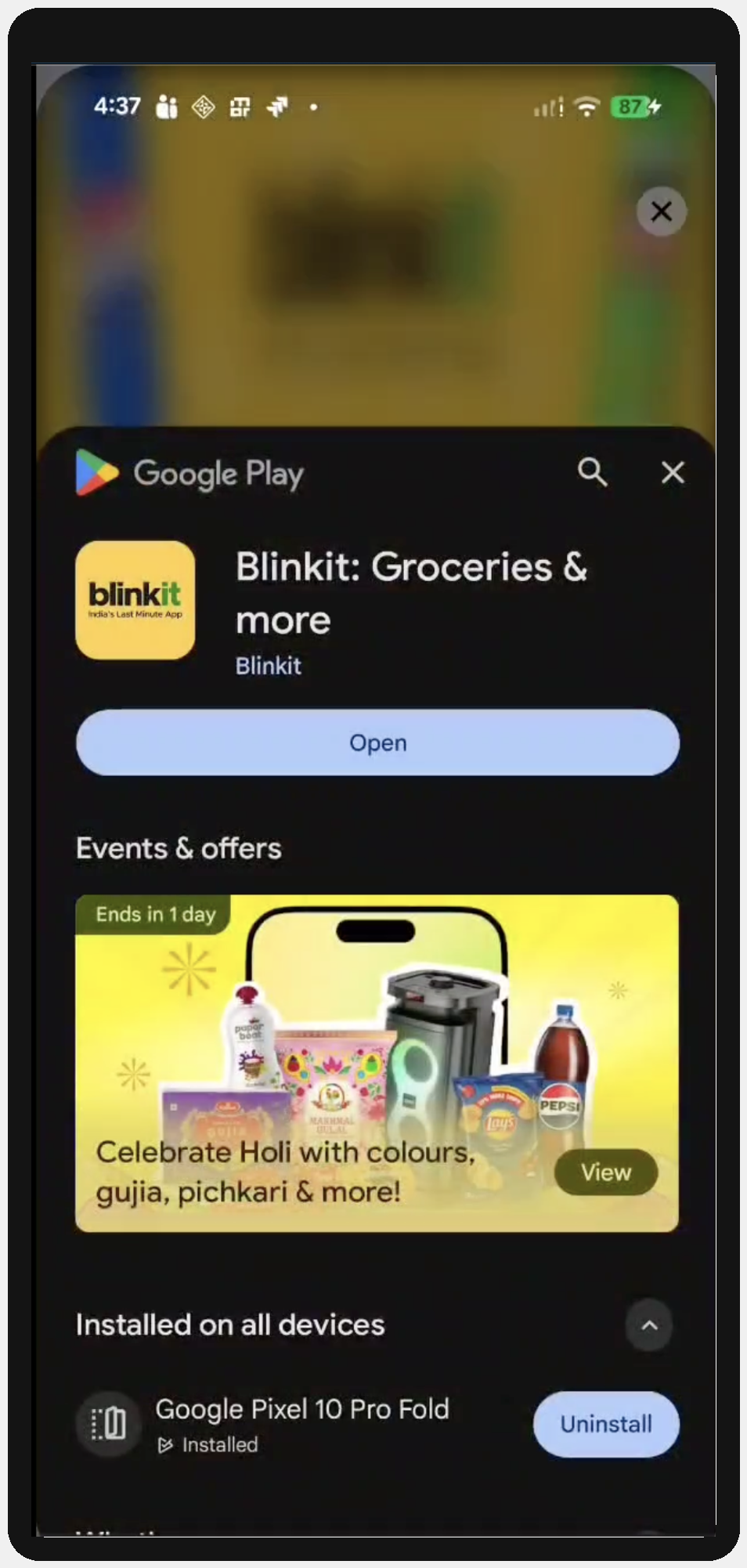
InMobi sets inlineinstallallowed = 1 only when all of the following conditions are met:
BidRequest.imp.ext| Field | Type | Required | Description |
inlineinstallallowed |
integer | Yes | 1 = available, 0/ absent = not available |
"ext": {
  "inlineinstallallowed": 1
}
BidResponse.seatbid[].bid[].ext.inlineinstall| Field | Type | Required | Description |
|---|---|---|---|
enabled |
boolean | Yes | 'true' to activate, false to opt out (default value is 'true'). |
referrer |
string | No* | Referrer string passed by the SDK to the Play Install API for attribution. * Strongly recommended. |
"ext": {
  "inlineinstall": {
    "enabled": true,
    "referrer": "dsp1_760a59d6-1507-11f1-96c3-9565488fcc70"
  }
}
bid.bundle (the advertised app's package name) is required when enabled=true.
The InMobi SDK calls the Google Play Install API directly on the device. The flow bypasses the Play Store redirect entirely, which means:
You must pass the referrer explicitly in the bid response for attribution.
Without a referrer:
We recommend passing the install referrer explicitly in the bid response for attribution. If the DSP does not use Install Referrer for third-party attributions, then this recommendation may not be relevant for you.
InMobi passes the referrer to the Google Play Install API exactly as received. It does not validate or modify the value.
Auto Android Inline Install lets you control whether InMobi Exchange opens the Android Inline Install experience automatically, without a user tap, and whether click trackers fire when it does. It builds on Android Inline Installs and is available wherever Inline Install is available.
Two bid response fields control Android Auto Inline Install and Android Auto Inline Install Click:
autoinlineinstall): Automatically opens the Inline Install experience for impressions where Inline Install is available after video completion or User skip.autoinlineinstallclick): Fires click trackers when Android Auto Inline Install opens automatically.Android Auto Inline Install is available for an impression when all of the following are true:
imp.ext.inlineinstallallowed = 1.InMobi sets imp.ext.inlineinstallallowed only when these conditions are met, so you don’t need to add a new bid request field. Android Auto Inline Install Click also requires Android Auto Inline Install to be set to true. For more information on the setup details, see Android Inline Installs.
| Attribute | Description | Type |
autoinlineinstall |
Whether InMobi Exchange should automatically open Inline Install. true = yes (default value); false = no. |
Boolean |
autoinlineinstallclick |
Whether InMobi Exchange should fire click trackers when Inline Install opens automatically. true = yes; false = no (default value). |
Boolean |
"seatbid": [
  {
    "bid": [
      {
        "bundle": "com.advertiser.game",
        "ext": {
          "inlineinstall": {
            "enabled": true,
            "referrer": "dsp1_760a59d6-1507-11f1-96c3-9565488fcc70",
            "autoinlineinstall": true,
            "autoinlineinstallclick": true
          }
        }
      }
    ]
  }
]
The referrer field is optional at the protocol level. However, it is strongly recommended for any campaign where you need install attribution. Since the InMobi SDK calls the Play Install API directly (rather than redirecting through a Play Store URL), there is no redirect chain for the MMP to read a referrer from. The only way to pass a referrer in this flow is explicitly through this field. Without it:
enabled=true on an impression where inlineinstallallowed was not set?If inlineinstallallowed is absent or set to 0 in the bid request, the device is not eligible for Inline Install. Setting enabled=true in the bid response will have no effect — the InMobi SDK will fall back to standard store redirect behaviour. DSPs should treat inlineinstallallowed = 1 as a prerequisite before activating Inline Install.
enabled=false interact with it?InMobi may enable automatic Inline Install opt-in for DSPs who have agreed to it. When auto opt-in is active, eligible impressions will be treated as opted-in by default, even without an explicit enabled=true in the bid response.
To override this and explicitly opt out of Inline Install for a specific bid, set enabled=false in the bid response extension.
bid.bundle required when activating Inline Install?Yes. When enabled=true, DSP must include a valid bid.bundle in the bid object. This is the Android package name of the app to be installed (e.g. com.advertiser.game). The SDK uses this to identify the app on the Play Store. Bids with enabled=true and a missing or invalid bundle will not be processed for Inline Install.
Yes, click trackers will be invoked as usual when the user clicks on the ad.
No. There is no separate bid request parameter for Android Auto Inline Install support. DSPs can check the existing imp.ext.inlineinstallallowed = 1 signal to determine whether Inline Install is supported for an impression. Android Auto Inline Install behavior is controlled separately through the supported bid response parameters.
autoinlineinstall is true but inlineinstall.enabled is false?The Inline Install experience can still be invoked when the user clicks the ad. However, it will not launch automatically after the video completes or the user skips the video, since Inline Install is not enabled for automatic invocation on that impression. Neither Android Auto Inline Install nor Auto Inline Install Click will be triggered.
autoinlineinstallclick is true but autoinlineinstall is false?Android Auto Inline Install Click does not run. It requires Android Auto Inline Install to be set to true.
By installing this SDK update, you agree that your Children Privacy Compliance setting remains accurate or that you will update that setting, whenever there is a change in your app's audience. You may update the app's Children Privacy Compliance settings at https://publisher.inmobi.com/my-inventory/app-and-placements.
 Support Center


